Home
247
Survey Responses
18
Interviews
5
Usability Testing Rounds
85.1%
Tree Testing Success Rate
Skip the checkout line.
Skip the checkout line.
A 6-month research and design project into the real friction of grocery self-checkout, from the parking lot to the exit gate. 18 interviews, 5 rounds of usability testing, and a produce identification redesign that brought the error rate from 40% to zero.
A 6-month research and design project into the real friction of grocery self-checkout, from the parking lot to the exit gate. 18 interviews, 5 rounds of usability testing, and a produce identification redesign that brought the error rate from 40% to zero.
247
Survey Responses
18
Interviews
5
Usability Testing Rounds
Before Getting Started
Before Getting Started
Project context
Project context
All activities described in this case study were carried out individually over the course of 6 months. This case study is a personal learning project and has no direct relationship with the Square brand or company.
Square operates in the payments and business management systems sector. This project expands that ecosystem into self-checkout, using real products as a starting point rather than an abstract
concept.
All activities described in this case study were carried out individually over the course of 6 months. This case study is a personal learning project and has no direct relationship with the Square brand or company.
Square operates in the payments and business management systems sector. This project expands that ecosystem into self-checkout, using real products as a starting point rather than an abstract
concept.
Business Context and Objectives
Business Context and Objectives
What does the project need to solve?
What does the project need to solve?
SquareUp currently operates in the payments sector but is seeking expansion by introducing a new mobile product and
transforming Square Register, an existing product, into a self-checkout system that meets customers' needs when shopping in grocery stores.
The project focuses on the phase between product selection and leaving the store.
SquareUp currently operates in the payments sector but is seeking expansion by introducing a new mobile product and
transforming Square Register, an existing product, into a self-checkout system that meets customers' needs when shopping in grocery stores.
The project focuses on the phase between product selection and leaving the store.
1
1
Transform Square Register into a self-checkout system, giving users the freedom to complete their purchases independently.
Transform Square Register into a self-checkout system, giving users the freedom to complete their purchases independently.
2
2
Design a new mobile product to support users throughout their shopping journeys before and during grocery store visits.
Design a new mobile product to support users throughout their shopping journeys before and during grocery store visits.
3
3
Simplify the journey and the product so that people of different ages and backgrounds can use the system without needing assistance.
Simplify the journey and the product so that people of different ages and backgrounds can use the system without needing assistance.
4
4
Maintain the security and traceability of the process, ensuring that all items are identified correctly.
Maintain the security and traceability of the process, ensuring that all items are identified correctly.
Process
Process
I didn’t know where to start. So I went to see for myself
I didn’t know where to start. So I went to see for myself
Before making any assumptions, I needed to understand what was actually happening in retail. I started by observing customers in stores and supermarket chains across São Paulo, just observing. Then I gathered opinions from online forums, conducted a survey, carried out interviews, and mapped the entire service journey, from the parking lot to the exit receipt.
The process was not linear. Each step raised new questions that led me to the next one.
Before making any assumptions, I needed to understand what was actually happening in retail. I started by observing customers in stores and supermarket chains across São Paulo, just observing. Then I gathered opinions from online forums, conducted a survey, carried out interviews, and mapped the entire service journey, from the parking lot to the exit receipt.
The process was not linear. Each step raised new questions that led me to the next one.

Field study
Survey
Interviews
Service Blueprint
Desk research
Field study
Survey
Interviews
Service Blueprint
Desk research
Personas
JTBD
MoSCoW
Heuristic Evaluation
Card Sorting
Tree Testing
Personas
JTBD
MoSCoW
Heuristic Evaluation
Card Sorting
Tree Testing
Crazy 8s
Low-Fidelity Wireframes
Paper prototype
High-Fidelity Wireframes
Crazy 8s
Low-Fidelity Wireframes
Paper prototype
High-Fidelity Wireframes
5 Testing Rounds
Mid-Fidelity Prototypes × 3
High-Fidelity Prototypes × 4
Maze + In-Person Testing
5 Testing Rounds
Mid-Fidelity Prototypes × 3
High-Fidelity Prototypes × 4
Maze + In-Person Testing
Other techniques applied but not presented: Tree Testing, Jobs Story analysis, WCAG AA accessibility benchmarking, and comparative analysis of existing interfaces.
What is the self-checkout customer's perspective?
What is the self-checkout customer's perspective?
Understanding the problem from the outside in
Understanding the problem from the outside in
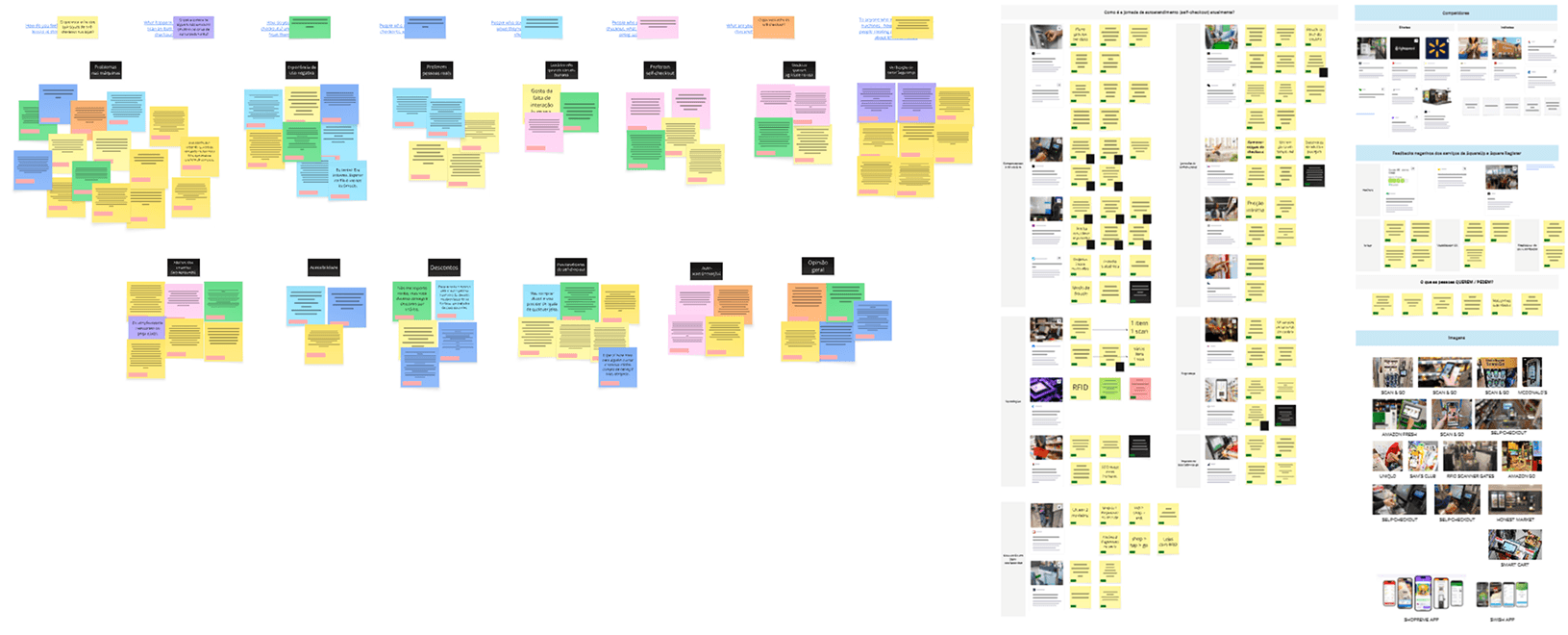
To understand how people feel about self-checkout before speaking with anyone, I explored online forums and communities, gathering spontaneous opinions from both Brazil and international markets.
At the same time, I conducted desk research using articles, reports, and news about the retail sector, comparing the Brazilian context with international markets.
To understand how people feel about self-checkout before speaking with anyone, I explored online forums and communities, gathering spontaneous opinions from both Brazil and international markets.
At the same time, I conducted desk research using articles, reports, and news about the retail sector, comparing the Brazilian context with international markets.
Differences Across Regions
Differences Across Regions
Seeking perspectives from people around the world
Seeking perspectives from people around the world
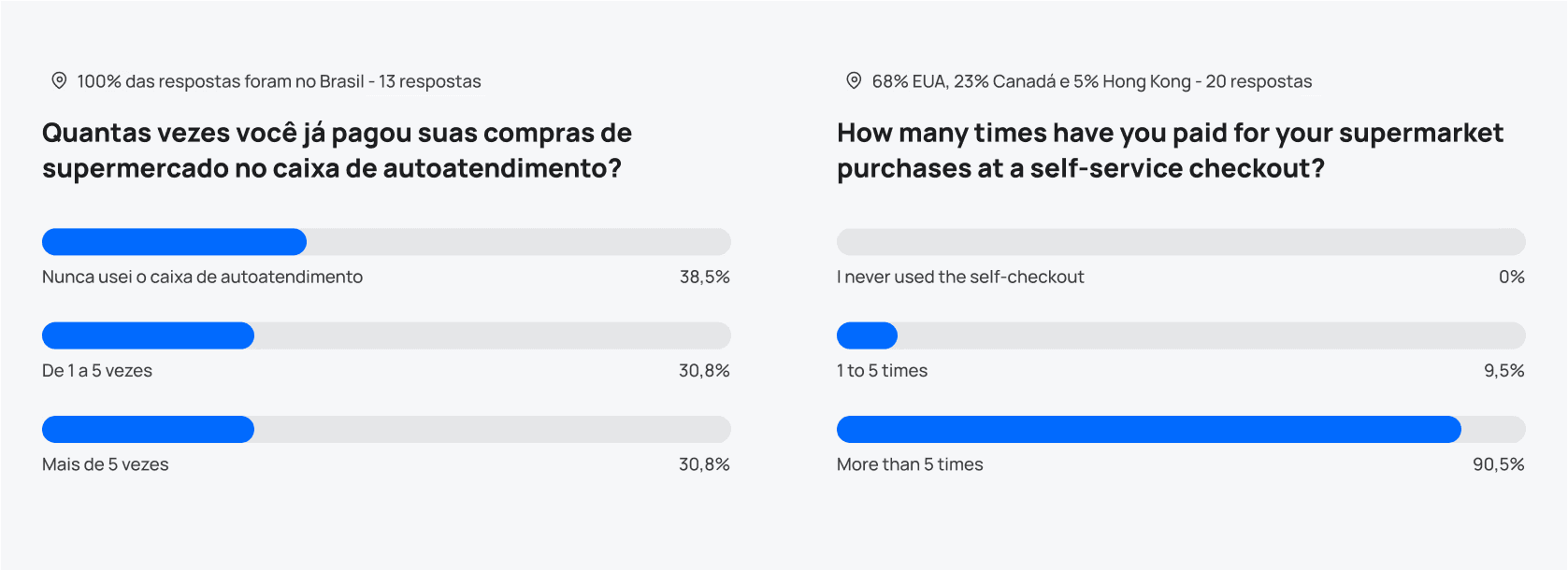
Even with the information I had gathered, some questions remained, which led me to conduct a survey. Although self-checkout is not yet widely adopted in Brazil, the data revealed the same three recurring problems regardless of market.
Even with the information I had gathered, some questions remained, which led me to conduct a survey. Although self-checkout is not yet widely adopted in Brazil, the data revealed the same three recurring problems regardless of market.
Key Survey Insights
Key Survey Insights
What the data revealed
What the data revealed
Shopping List
Shopping List
The feature that helps users the most while shopping. 73% reported creating a shopping list before leaving home.
The feature that helps users the most while shopping. 73% reported creating a shopping list before leaving home.
Cancel Without an Employee
Cancel Without an Employee
The ability to remove an item without requiring employee approval was cited as a top priority.
The ability to remove an item without requiring employee approval was cited as a top priority.
Barcode Scanning Difficulties
Barcode Scanning Difficulties
Users struggle with scanning barcodes, especially on damaged packaging.
Users struggle with scanning barcodes, especially on damaged packaging.
Produce Lookup Table
Produce Lookup Table
The produce lookup table is difficult to use — users dislike having to manually search for a code.
The produce lookup table is difficult to use — users dislike having to manually search for a code.
18+ Verification
18+ Verification
The ability to verify their own age for age-restricted items without interacting with an employee was mentioned spontaneously.
The ability to verify their own age for age-restricted items without interacting with an employee was mentioned spontaneously.
Guidance Throughout the Process
Guidance Throughout the Process
Users want more step-by-step guidance. They do not know what to do when something goes wrong.
Users want more step-by-step guidance. They do not know what to do when something goes wrong.
Pix
Pix
100% of participants reported using Pix as their preferred payment method. None of the self-checkout kiosks previously tested supported it.
100% of participants reported using Pix as their preferred payment method. None of the self-checkout kiosks previously tested supported it.
Exploring Self-Checkout
Exploring Self-Checkout
User insights and field observations
User insights and field observations
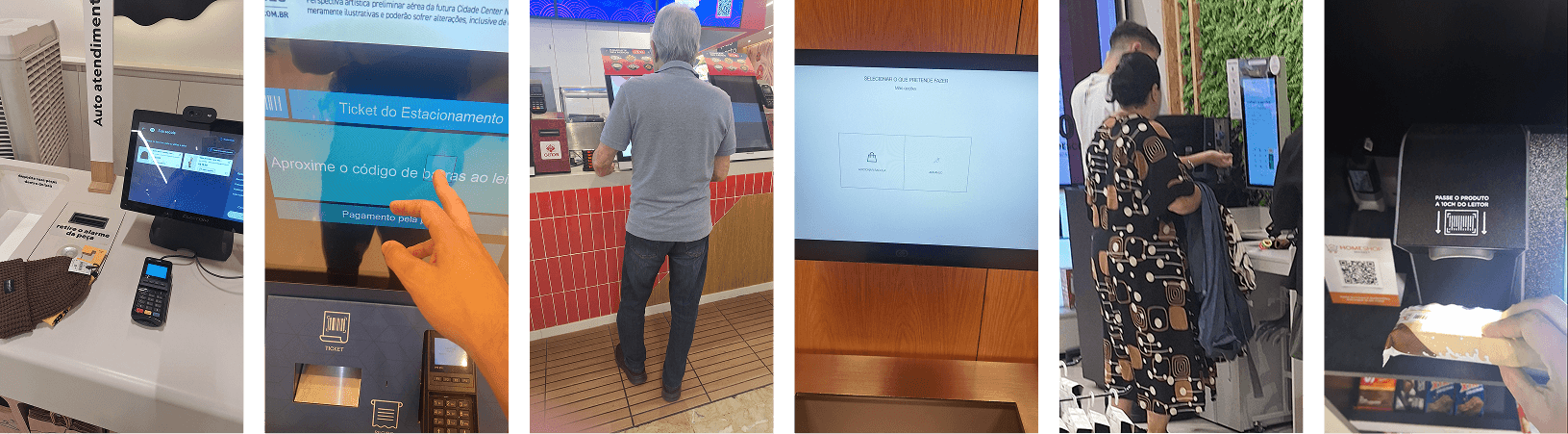
I conducted direct field immersion. I observed the behavior of shoppers across three retail chains: Carrefour, Extra, and Walmart, monitoring self-checkout kiosk usage and mapping friction points in real time.
To deepen my understanding, I conducted 18 interviews with customers who had used self-checkout at least once.
I conducted direct field immersion. I observed the behavior of shoppers across three retail chains: Carrefour, Extra, and Walmart, monitoring self-checkout kiosk usage and mapping friction points in real time.
To deepen my understanding, I conducted 18 interviews with customers who had used self-checkout at least once.
What I Learned from the Exploration
What I Learned from the Exploration
What competitors do well
What competitors do well
I analyzed leading players to understand which ideas were worth bringing into the project.
The item identification process at Zara and Amazon Go is automatic, eliminating the need to scan products one by one.
Product recommendations and offers are displayed based on the aisle where the user is currently located.
18+ verification is handled discreetly, without requiring a visibly present employee.
Customers can search for products and be guided to their actual location within the store.
I analyzed leading players to understand which ideas were worth bringing into the project.
The item identification process at Zara and Amazon Go is automatic, eliminating the need to scan products one by one.
Product recommendations and offers are displayed based on the aisle where the user is currently located.
18+ verification is handled discreetly, without requiring a visibly present employee.
Customers can search for products and be guided to their actual location within the store.
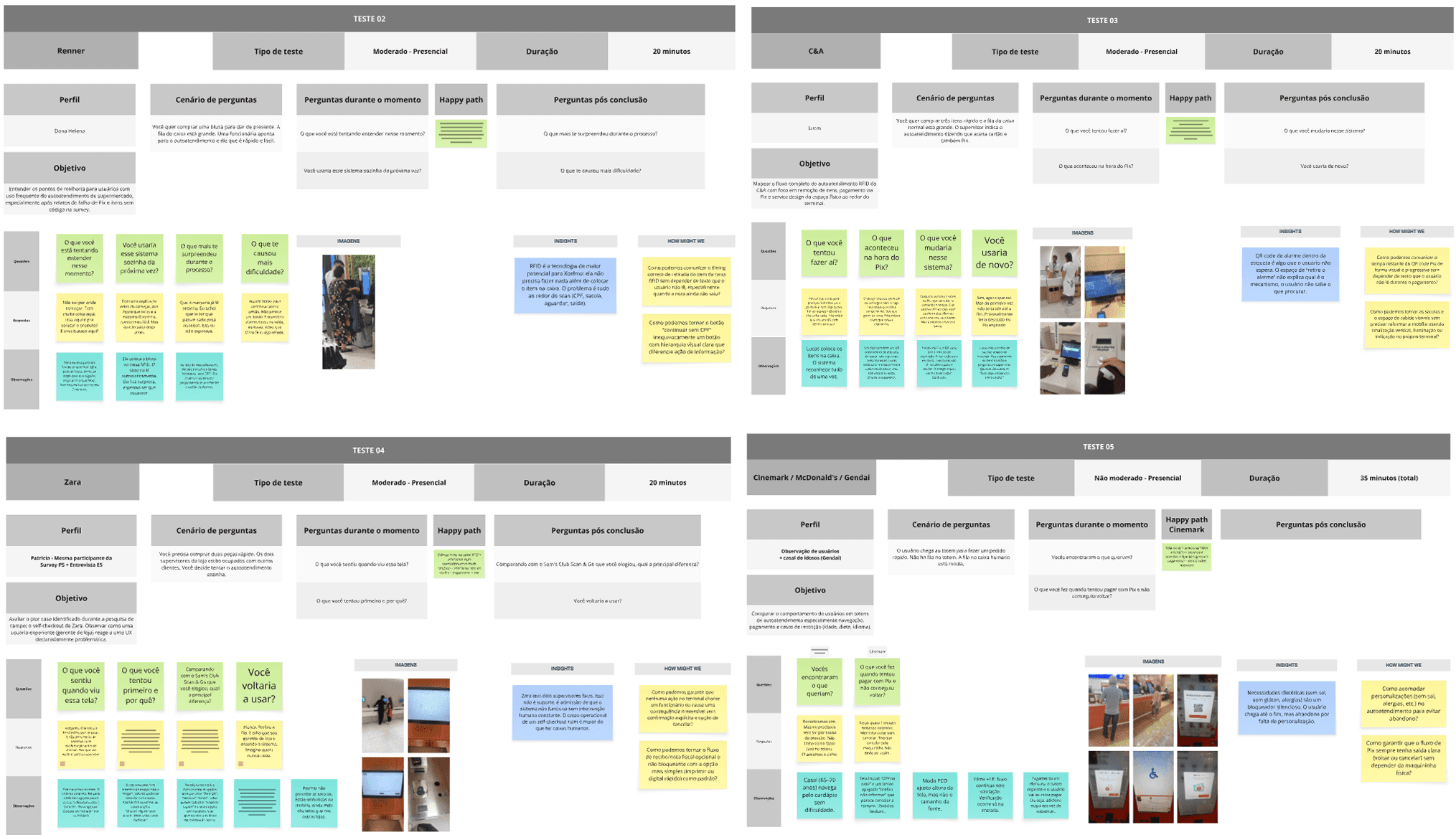
What users like and dislike
What users like and dislike
Users appreciate receiving suggestions for products related to items they are interested in.
Users appreciate receiving suggestions for products related to items they are interested in.
They value being able to view prices and products before going to the store.
They value being able to view prices and products before going to the store.
When an error occurs, users expect a person to be available to help. Good self-checkout does not eliminate human support, it makes it optional.
When an error occurs, users expect a person to be available to help. Good self-checkout does not eliminate human support, it makes it optional.
Users often choose traditional checkout for large shopping trips because they worry about scanning items twice or losing track of their purchases.
Users often choose traditional checkout for large shopping trips because they worry about scanning items twice or losing track of their purchases.
Users become frustrated when they discover that self-checkout does not accept Pix, often only after they have already started using the system.
Users become frustrated when they discover that self-checkout does not accept Pix, often only after they have already started using the system.
The employee-assisted 18+ verification process is embarrassing and exposes the customer.
The employee-assisted 18+ verification process is embarrassing and exposes the customer.
Visualizing the Problem End-to-End
Visualizing the Problem End-to-End
The problem from entrance to exit
The problem from entrance to exit
Using the journey map and service blueprint, I identified and synthesized every touchpoint and pain point uncovered throughout the research, creating a clear view of where users faced the greatest challenges.
Using the journey map and service blueprint, I identified and synthesized every touchpoint and pain point uncovered throughout the research, creating a clear view of where users faced the greatest challenges.
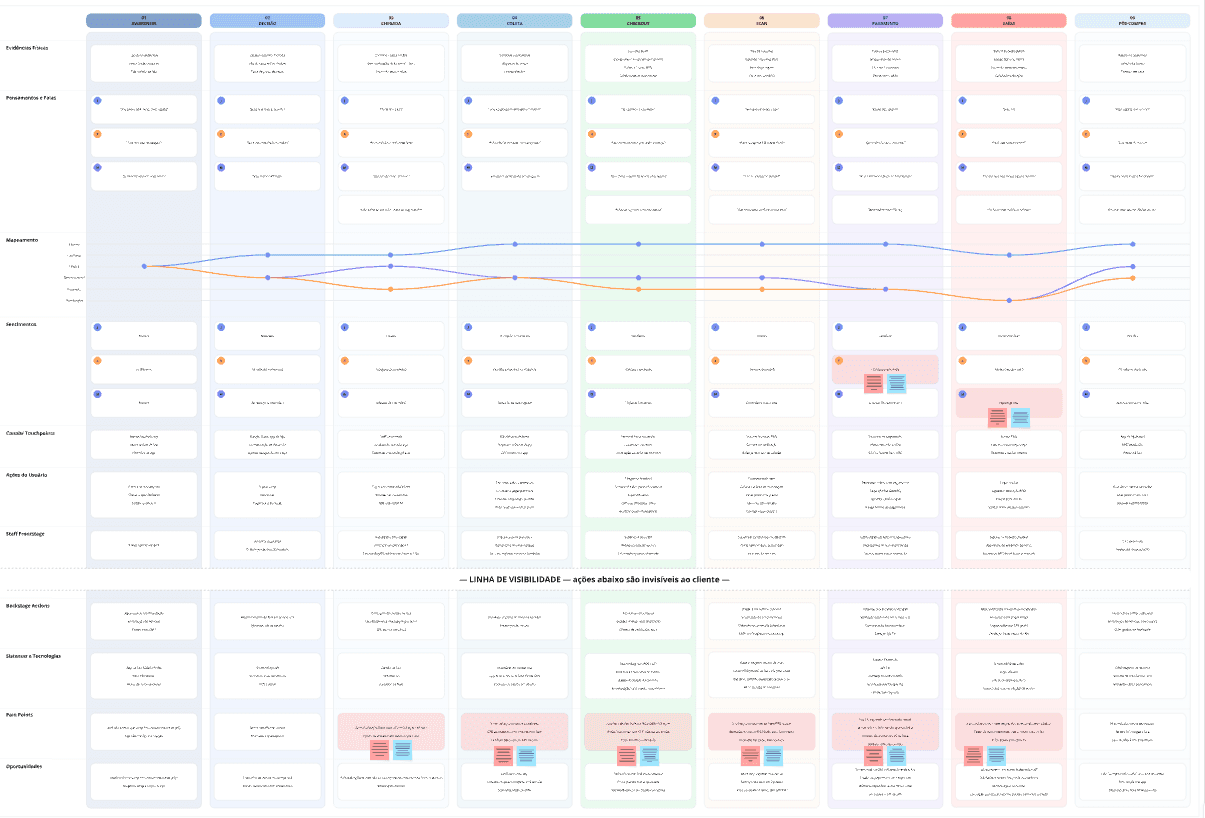
Summary of key user needs throughout the journey
Summary of key user needs throughout the journey
01
01
A fast way to identify and scan items while shopping
A fast way to identify and scan items while shopping
02
02
The ability to apply discounts and see the updated total in real time
The ability to apply discounts and see the updated total in real time
03
03
The ability to scan and pay while shopping without interruptions
The ability to scan and pay while shopping without interruptions
04
04
The option to request assistance from an employee without embarrassment
The option to request assistance from an employee without embarrassment
05
05
Freedom and autonomy throughout the entire shopping experience
Freedom and autonomy throughout the entire shopping experience
06
06
The ability to enter and leave the store without needing to speak to anyone
The ability to enter and leave the store without needing to speak to anyone
07
07
A shopping list that can be viewed and checked off during the trip
A shopping list that can be viewed and checked off during the trip
08
08
A system capable of verifying identity and age for 18+ items
A system capable of verifying identity and age for 18+ items
Personas
Personas
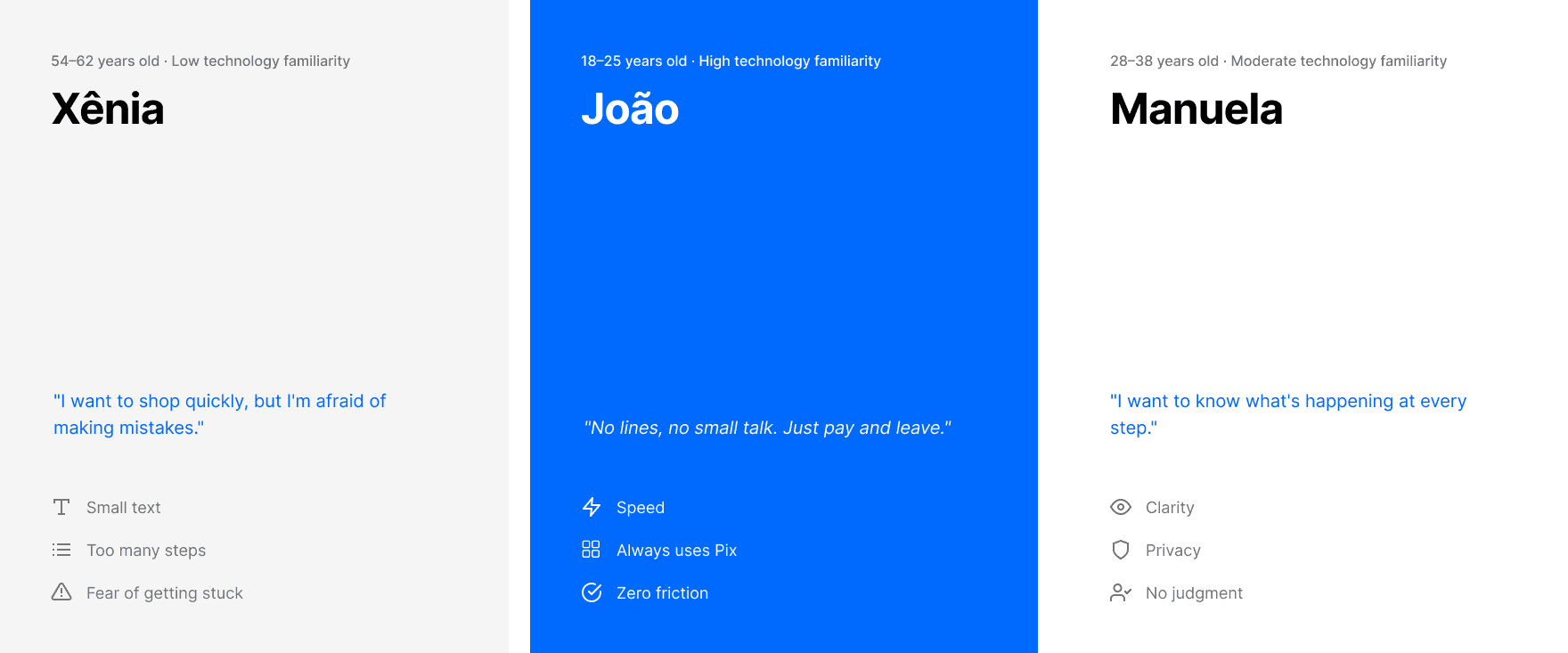
Three profiles. If it works for Xênia, it works for everyone
Three profiles. If it works for Xênia, it works for everyone
Xênia had never completed a self-checkout purchase without asking for help. She became the approval benchmark for every design decision.
Xênia had never completed a self-checkout purchase without asking for help. She became the approval benchmark for every design decision.
Jobs to be Done
Jobs to be Done
What People Actually Need to Get Done
What People Actually Need to Get Done
The Jobs to Be Done framework revealed that users want autonomy, speed, and the ability to complete their purchases without relying on anyone else.
The Jobs to Be Done framework revealed that users want autonomy, speed, and the ability to complete their purchases without relying on anyone else.
"When I'm in a hurry, I want to pay and leave in under three minutes without depending on anyone else's pace."
"When I'm in a hurry, I want to pay and leave in under three minutes without depending on anyone else's pace."
"When I have a lot of items, I want to scan them at my own pace without feeling pressured by people waiting behind me."
"When I have a lot of items, I want to scan them at my own pace without feeling pressured by people waiting behind me."
"When I buy an age-restricted item, I want to handle it discreetly without drawing attention."
"When I buy an age-restricted item, I want to handle it discreetly without drawing attention."
"When I scan the wrong item, I want to remove it without having to call an employee."
"When I scan the wrong item, I want to remove it without having to call an employee."
"When I arrive at the store, I want to remember what I need to buy without relying on memory."
"When I arrive at the store, I want to remember what I need to buy without relying on memory."
"When it's time to pay, I want to use Pix without finding out it's not accepted only at checkout."
"When it's time to pay, I want to use Pix without finding out it's not accepted only at checkout."
"When something goes wrong, I want to solve it myself before having to explain the situation to someone."
"When something goes wrong, I want to solve it myself before having to explain the situation to someone."
"When I finish shopping, I want to leave immediately with instant proof of purchase."
"When I finish shopping, I want to leave immediately with instant proof of purchase."
Pain Points Mapped
Pain Points Mapped
What users can control and what is outside their control.
What users can control and what is outside their control.
Separating problems into what users can control and what they cannot control was essential for defining where design could realistically help. The numbers below are referenced throughout the proposed solutions.
Separating problems into what users can control and what they cannot control was essential for defining where design could realistically help. The numbers below are referenced throughout the proposed solutions.
Problems users cannot control
Problems users cannot control
01
01
Slow customers in line: the environment does not cooperate
Slow customers in line: the environment does not cooperate
02
02
Employees unavailable when the kiosk gets stuck
Employees unavailable when the kiosk gets stuck
03
03
Lack of step-by-step guidance during the process
Lack of step-by-step guidance during the process
04
04
Lack of privacy in systems that use invasive facial recognition
Lack of privacy in systems that use invasive facial recognition
05
05
Stores that do not communicate accepted payment methods before use
Stores that do not communicate accepted payment methods before use
06
06
Employee-assisted 18+ verification processes that feel embarrassing
Employee-assisted 18+ verification processes that feel embarrassing
Problems users can control
Problems users can control
07
07
Taking too long to bag items at the end of the process
Taking too long to bag items at the end of the process
08
08
Forgetting what they need to buy
Forgetting what they need to buy
09
09
Difficulty using the system due to lack of familiarity
Difficulty using the system due to lack of familiarity
10
10
Selecting the wrong product during weighing because of small images and poor categorization
Selecting the wrong product during weighing because of small images and poor categorization
11
11
Searching for barcodes on produce items such as fruits and vegetables
Searching for barcodes on produce items such as fruits and vegetables
12
12
Not knowing what to do when the exit gate does not open
Not knowing what to do when the exit gate does not open
Square Register e Square App
Square Register e Square App
Defining solutions based on project insights and objectives
Defining solutions based on project insights and objectives
What can reduce unwanted touchpoints and user pain points in the self-checkout experience?
What can reduce unwanted touchpoints and user pain points in the self-checkout experience?
Square Register
Square Register
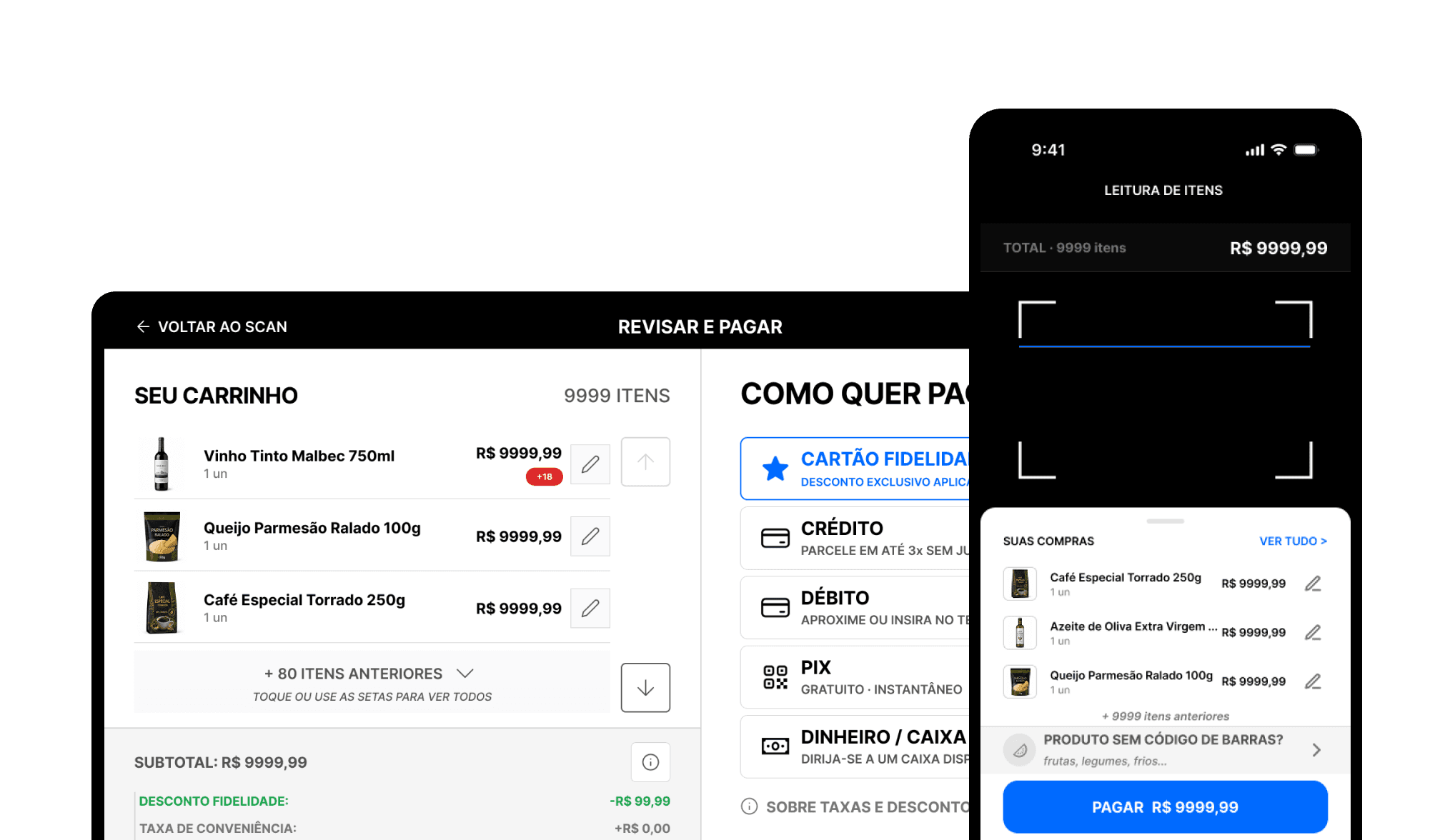
Used as a fast checkout solution. It includes an integrated barcode scanner beneath the screen, a built-in scale for items without barcodes, 18+ verification through CPF, and an exit receipt printer with a QR code.
Used as a fast checkout solution. It includes an integrated barcode scanner beneath the screen, a built-in scale for items without barcodes, 18+ verification through CPF, and an exit receipt printer with a QR code.
Square App
Square App
Users can scan products using their phone camera, keep an active shopping list while scanning, complete 18+ verification directly within the flow, access their purchase history, and manage a profile linked to CPF registration on invoices.
Users can scan products using their phone camera, keep an active shopping list while scanning, complete 18+ verification directly within the flow, access their purchase history, and manage a profile linked to CPF registration on invoices.
Designing User Interactions
Designing User Interactions
User Flows, Card Sorting, Tree Testing, and Crazy 8s
User Flows, Card Sorting, Tree Testing, and Crazy 8s
Based on a moderated Card Sorting session with 12 participants and 40 cards using Maze, I organized the navigation structure. I then conducted two rounds of Tree Testing with 14 participants using Treejack to validate the hierarchy before creating any wireframes, achieving an 85.1% direct success rate in the final structure.
With that foundation in place, I ran a Crazy 8s session with two user profiles: one person who had never used self-checkout before and another who was already familiar with the process.
Based on a moderated Card Sorting session with 12 participants and 40 cards using Maze, I organized the navigation structure. I then conducted two rounds of Tree Testing with 14 participants using Treejack to validate the hierarchy before creating any wireframes, achieving an 85.1% direct success rate in the final structure.
With that foundation in place, I ran a Crazy 8s session with two user profiles: one person who had never used self-checkout before and another who was already familiar with the process.

In order: User Sorting, Treejack, Crazy 8s.
Test Nº1
Test Nº1
Learning from Mistakes Before the Final Design
Learning from Mistakes Before the Final Design
Before investing time in the final design, I decided to learn from potential usability issues by conducting the first round of testing using paper wireframes printed at iPhone 15 Pro size.
I tested the main app and kiosk flows using the think-aloud protocol. As participants interacted, I manually swapped the paper screens without interfering in the process.
Before investing time in the final design, I decided to learn from potential usability issues by conducting the first round of testing using paper wireframes printed at iPhone 15 Pro size.
I tested the main app and kiosk flows using the think-aloud protocol. As participants interacted, I manually swapped the paper screens without interfering in the process.
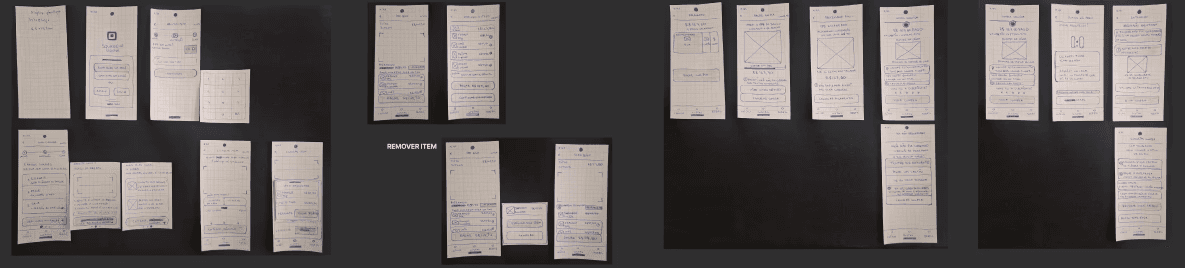
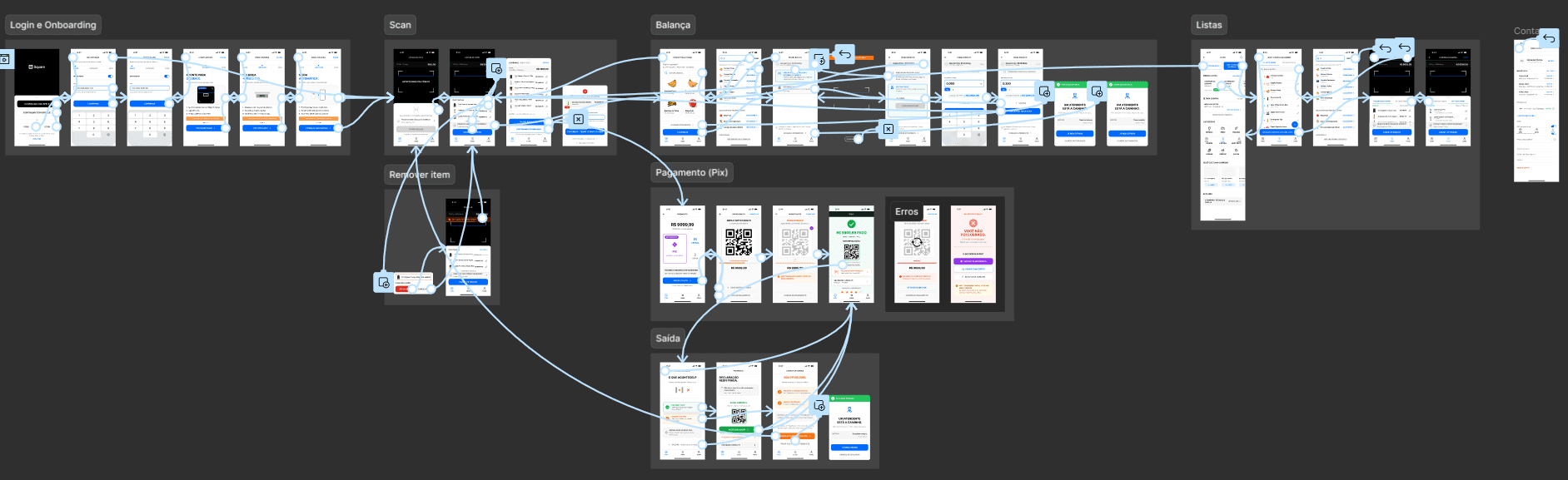
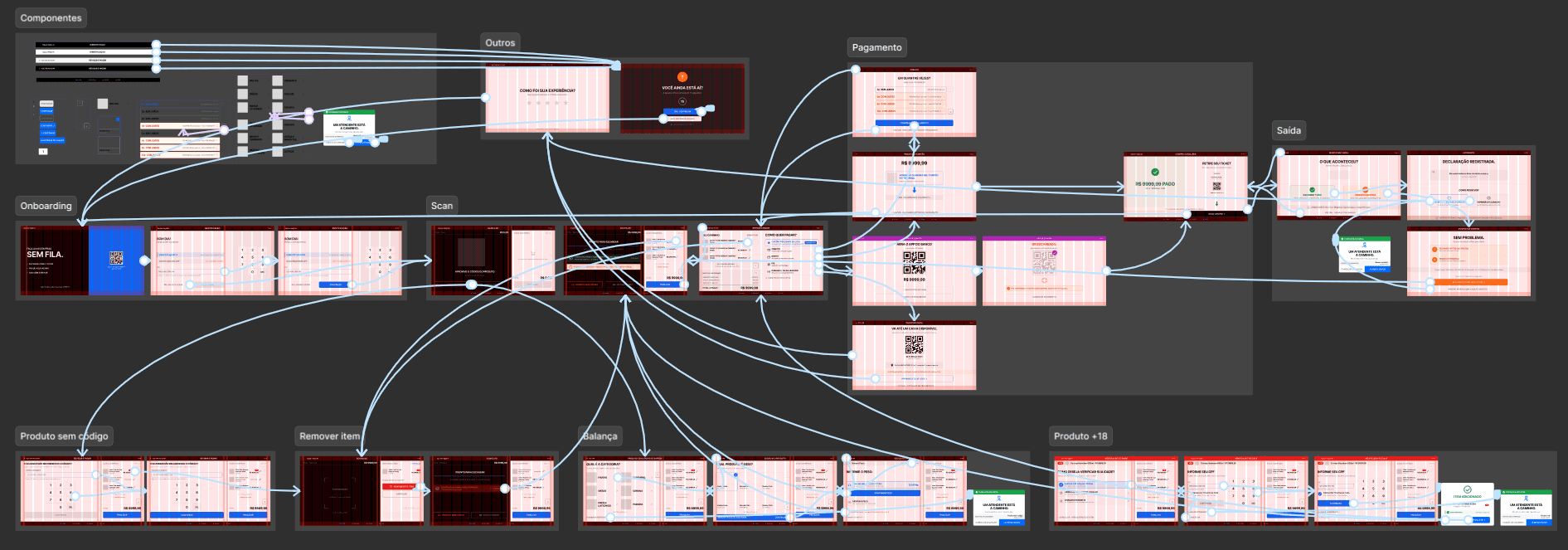
View all wireframe versions and hi-fi prototype in Figma
View all wireframe versions and hi-fi prototype in Figma
🡭
Presenting the Solutions
Presenting the Solutions
These are the solutions to the identified problems. Explore each one in detail
These are the solutions to the identified problems. Explore each one in detail
Based on the pain points identified earlier, I designed specific solutions for each challenge. Every solution indicates where the problem was discovered and which pain points it addresses.
Based on the pain points identified earlier, I designed specific solutions for each challenge. Every solution indicates where the problem was discovered and which pain points it addresses.
How do users prefer the scanning process to work?
How do users prefer the scanning process to work?
"I want to scan everything with my phone and leave. No lines, no conversation."
"I want to scan everything with my phone and leave. No lines, no conversation."
— Survey
— Survey
"I prefer using a scanner that I can carry around the store while shopping."
"I prefer using a scanner that I can carry around the store while shopping."
— Desk Research
— Desk Research
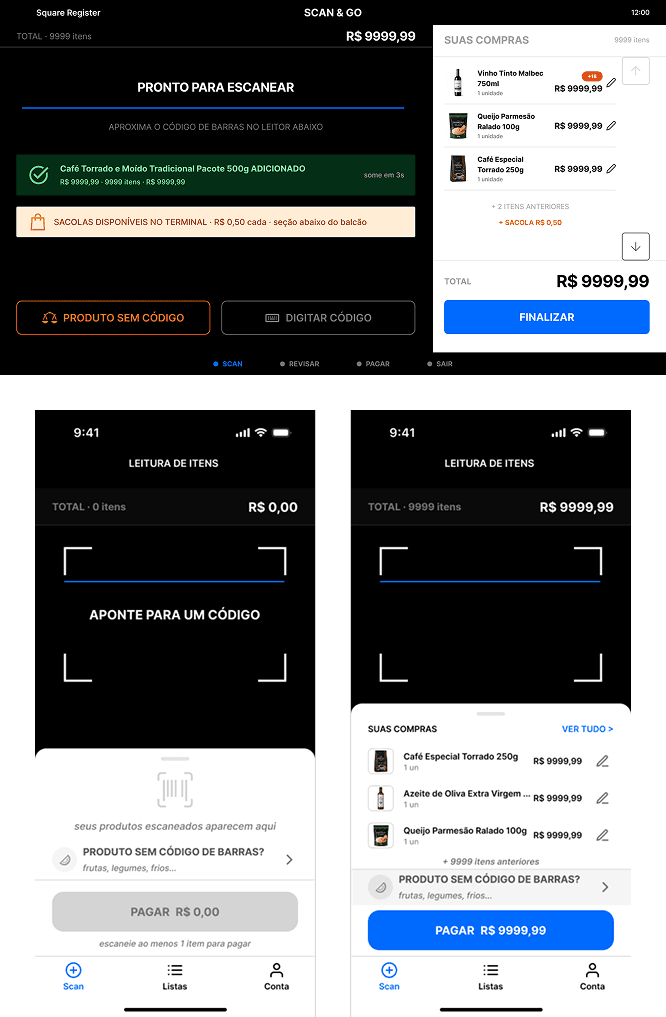
The app keeps the camera continuously active while the cart remains visible below in a single bottom sheet. When an item is scanned, it is confirmed with a spring animation that does not interrupt the flow. The camera remains visible but dimmed in the background, so users always know they are still in scanning mode.
The app keeps the camera continuously active while the cart remains visible below in a single bottom sheet. When an item is scanned, it is confirmed with a spring animation that does not interrupt the flow. The camera remains visible but dimmed in the background, so users always know they are still in scanning mode.
This solution addresses pain points: 1 • 3 • 9
This solution addresses pain points: 1 • 3 • 9
How can products without barcodes be identified intuitively, without code tables?
How can products without barcodes be identified intuitively, without code tables?
"The produce lookup table is awful. I never know the correct code. I give up halfway through."
"The produce lookup table is awful. I never know the correct code. I give up halfway through."
— Interview, Xênia, 54 years old
— Interview, Xênia, 54 years old
"At Extra, the scale asks for a code that isn't visible anywhere."
"At Extra, the scale asks for a code that isn't visible anywhere."
— Field Observation
— Field Observation
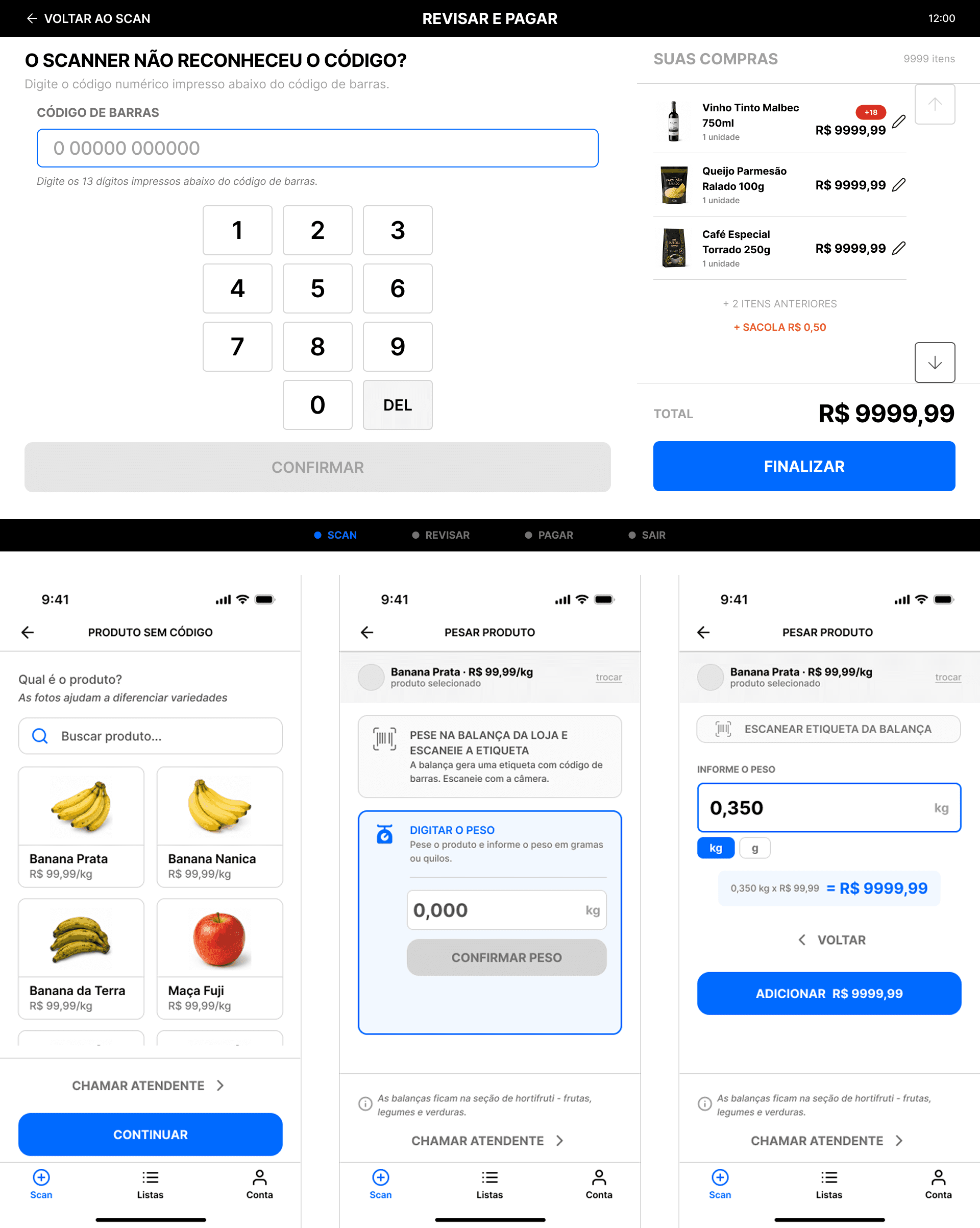
A category selection screen was introduced before the product grid. Users first choose a category and then identify the product using a high-quality image (300px). Weight is captured through the integrated scale, and the price is calculated automatically in real time.
Without this screen, 40% of participants selected the wrong product. With it: zero errors.
A category selection screen was introduced before the product grid. Users first choose a category and then identify the product using a high-quality image (300px). Weight is captured through the integrated scale, and the price is calculated automatically in real time.
Without this screen, 40% of participants selected the wrong product. With it: zero errors.
This solution addresses pain points: 10 • 11
This solution addresses pain points: 10 • 11
How can users verify their own age without requiring an employee?
How can users verify their own age without requiring an employee?
"Being able to verify my age for 18+ items instead of needing an employee."
"Being able to verify my age for 18+ items instead of needing an employee."
— Survey
— Survey
"At Extra, an employee checks the customer's ID in front of everyone."
"At Extra, an employee checks the customer's ID in front of everyone."
— Field Observation
— Field Observation
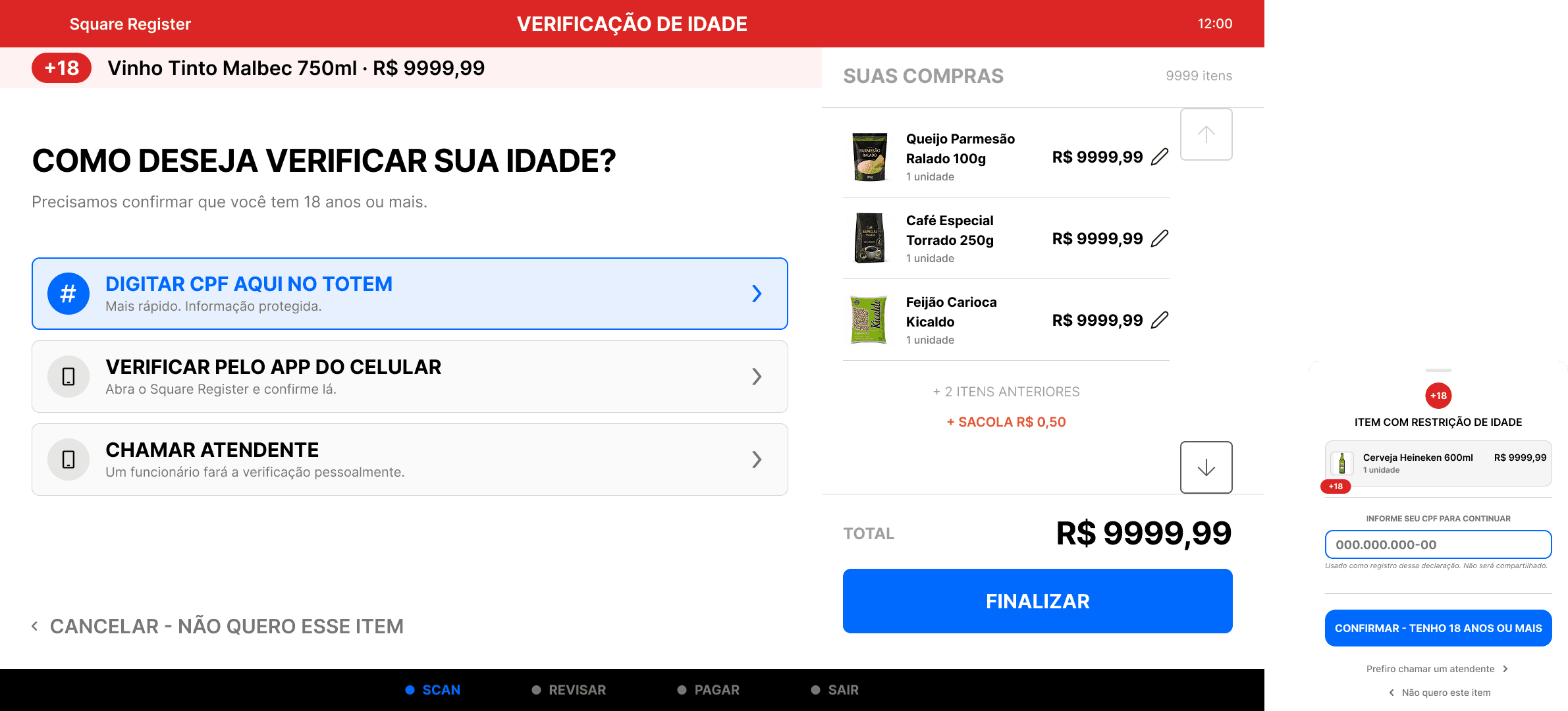
When the system detects an age-restricted item, it offers three options: enter CPF on the kiosk, verify through the app, or request assistance. If the CPF has already been provided, verification happens automatically.
A privacy notice appears before the CPF field. Participant P5 initially refused to enter their CPF before reading that the information would not be shared. The order was changed accordingly.
When the system detects an age-restricted item, it offers three options: enter CPF on the kiosk, verify through the app, or request assistance. If the CPF has already been provided, verification happens automatically.
A privacy notice appears before the CPF field. Participant P5 initially refused to enter their CPF before reading that the information would not be shared. The order was changed accordingly.
This solution addresses pain points: 6 • 12
This solution addresses pain points: 6 • 12
How can we ensure users do not get stuck at the exit when the sensor fails to open?
How can we ensure users do not get stuck at the exit when the sensor fails to open?
"If this were a real store, I would have called an employee. I would have been stuck there."
"If this were a real store, I would have called an employee. I would have been stuck there."
— Paper Test
— Paper Test
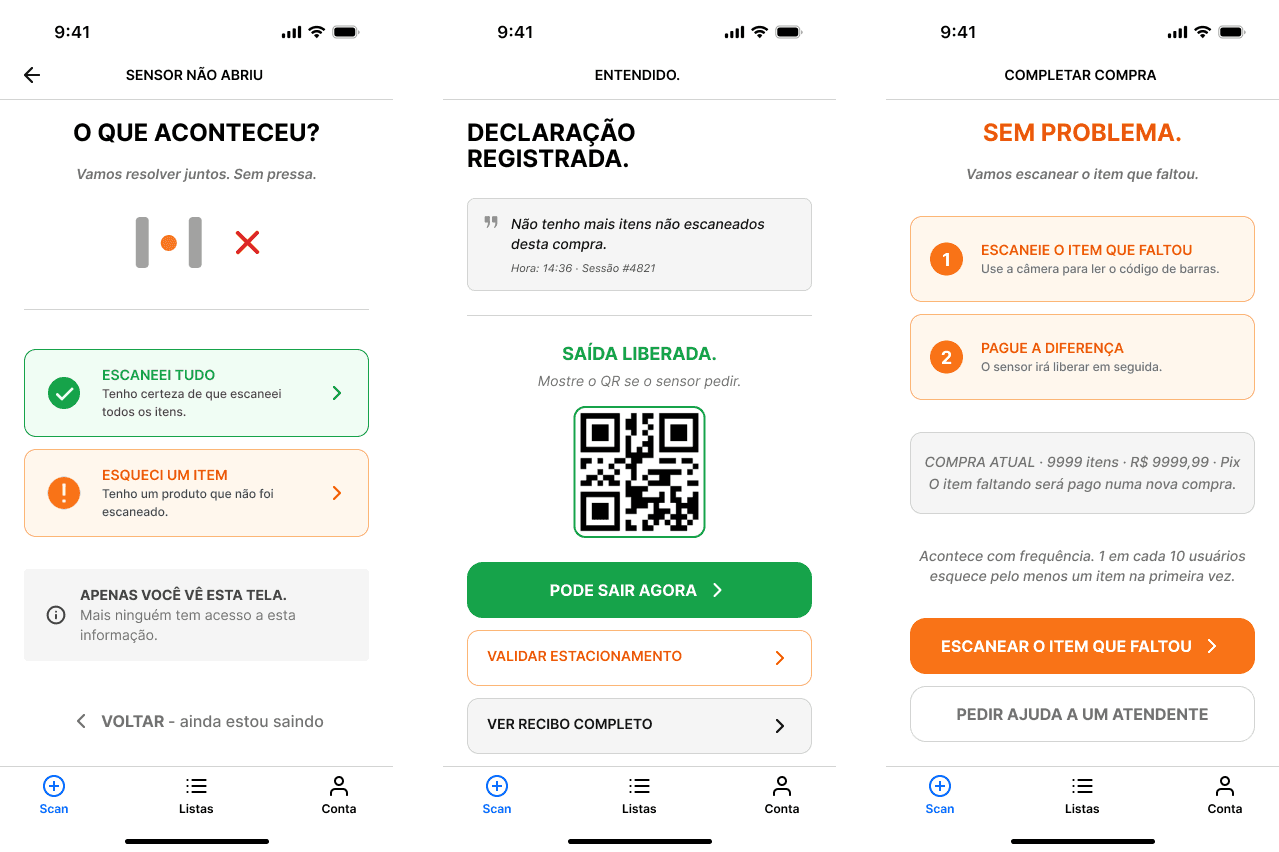
The "The sensor didn't open" button was redesigned from a subtle 14px text link into a 52px card with an icon and sufficient contrast. Users can declare that all items were scanned, and the declaration is logged with a timestamp and session data. The exit is then released without requiring employee intervention.
The "The sensor didn't open" button was redesigned from a subtle 14px text link into a 52px card with an icon and sufficient contrast. Users can declare that all items were scanned, and the declaration is logged with a timestamp and session data. The exit is then released without requiring employee intervention.
This solution addresses pain points: 12
This solution addresses pain points: 12
How can we help users avoid forgetting what they need to buy?
How can we help users avoid forgetting what they need to buy?
"I first clicked on Lists expecting to create one, then add items. It felt like I needed to create the list first and only then add something to it."
"I first clicked on Lists expecting to create one, then add items. It felt like I needed to create the list first and only then add something to it."
— Usability Test
— Usability Test
"The app doesn't really help me while I'm shopping. I still use paper."
"The app doesn't really help me while I'm shopping. I still use paper."
— Interview, Manuela, 33 years old
— Interview, Manuela, 33 years old
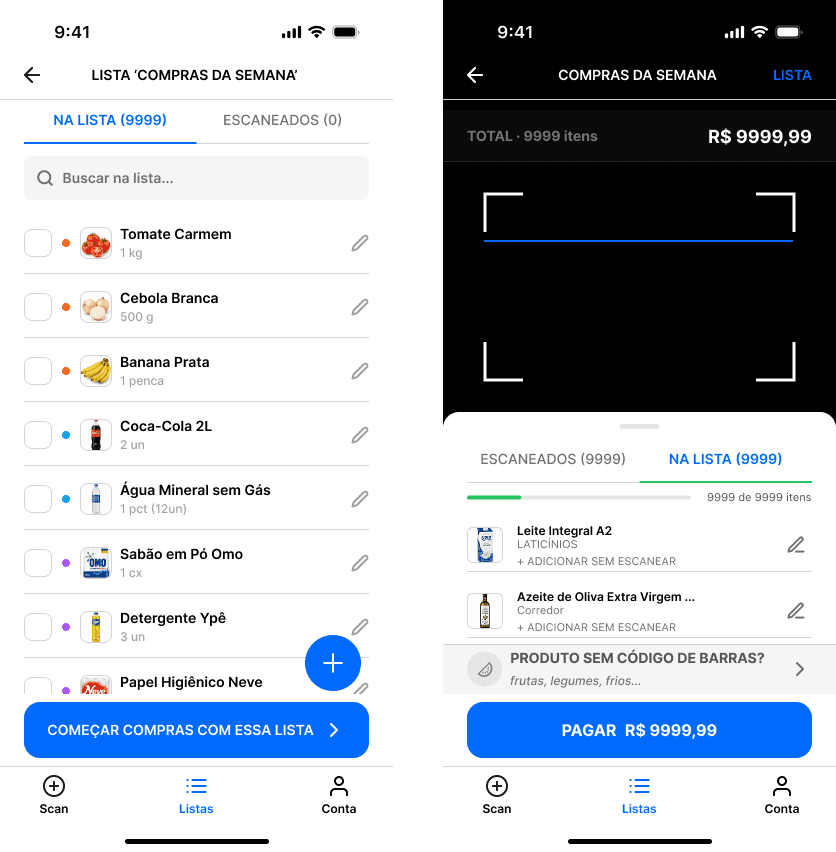
The app includes a dedicated list hub where users can create, edit, and activate shopping lists before leaving home. During scanning, the interface maintains two tabs: SCANNED and ON THE LIST. When an item from the list is scanned, it is checked off automatically. A progress bar provides visibility into completion status.
The app includes a dedicated list hub where users can create, edit, and activate shopping lists before leaving home. During scanning, the interface maintains two tabs: SCANNED and ON THE LIST. When an item from the list is scanned, it is checked off automatically. A progress bar provides visibility into completion status.
This solution addresses pain point: 8
This solution addresses pain point: 8
App and Kiosk Prototyping
App and Kiosk Prototyping
View the full research board on Miro
View the full research board on Miro
Desk Research · Affinity Mapping · Survey · Field Observations · Service Blueprint · Journey Map · Personas · JTBD · Card Sorting · Tree Testing · Crazy 8s · MoSCoW · Pain Points · HMWs
Desk Research · Affinity Mapping · Survey · Field Observations · Service Blueprint · Journey Map · Personas · JTBD · Card Sorting · Tree Testing · Crazy 8s · MoSCoW · Pain Points · HMWs
🡭
Next Steps
Next Steps
Future opportunities for product evolution and expansion
Future opportunities for product evolution and expansion
The following features were deprioritized during this project but could add value to both the product and the business in future versions.
The following features were deprioritized during this project but could add value to both the product and the business in future versions.
Features (v2)
Features (v2)
Store aisle map + shopping route guidance: requires an internal map for each store.
Loyalty program: each retail chain has its own system and would require partnerships.
Monthly budget tracking: expands the product beyond self-checkout into personal finance management.
Scalability across multiple supermarket chains: requires a store selection flow.
Store aisle map + shopping route guidance: requires an internal map for each store.
Loyalty program: each retail chain has its own system and would require partnerships.
Monthly budget tracking: expands the product beyond self-checkout into personal finance management.
Scalability across multiple supermarket chains: requires a store selection flow.
Retention Opportunities (Open Questions)
Retention Opportunities (Open Questions)
Could gamification increase engagement? How would it fit within the grocery shopping experience?
Could a rewards club improve retention? What types of rewards would be meaningful?
Could app adoption be encouraged through discounts? How would those incentives be managed by retailers?
Could the system suggest items based on a user's recurring purchases?
Could gamification increase engagement? How would it fit within the grocery shopping experience?
Could a rewards club improve retention? What types of rewards would be meaningful?
Could app adoption be encouraged through discounts? How would those incentives be managed by retailers?
Could the system suggest items based on a user's recurring purchases?
Opportunities
Opportunities
Creating spaces for conversation within the supermarket.
Creating spaces for conversation within the supermarket.
One of the project's goals was to make shopping faster. While investigating the causes of delays, I discovered that some older customers felt less lonely when talking to other people in line or interacting with cashiers. This highlights the importance of deeply understanding the problem. If I had only considered low familiarity with technology, this pattern would never have surfaced.
One of the project's goals was to make shopping faster. While investigating the causes of delays, I discovered that some older customers felt less lonely when talking to other people in line or interacting with cashiers. This highlights the importance of deeply understanding the problem. If I had only considered low familiarity with technology, this pattern would never have surfaced.
Scalability Across Supermarkets
Scalability Across Supermarkets
The system was initially designed for a specific supermarket. To scale across multiple retail chains, it would be necessary to introduce a flow that allows users to select their current store. This model could then be expanded to additional supermarkets, enabling more people to use the service.
The system was initially designed for a specific supermarket. To scale across multiple retail chains, it would be necessary to introduce a flow that allows users to select their current store. This model could then be expanded to additional supermarkets, enabling more people to use the service.
Thank You!
Thank You!
ROLE
Product Designer
Product Designer
DATE
February 2026 - June 2026
February 2026 - June 2026
TOOLS
Figma · Miro · Google Forms · Optimal Workshop · Treejack · Maze
Figma · Miro · Google Forms · Optimal Workshop · Treejack · Maze
INDUSTRY
Self-Checkout
Self-Checkout
© 2026
Matheus Paiva
© 2026
Matheus Paiva
© 2026
Matheus Paiva